How to Upload Music Videos to Spotify (Step-by-Step Guide for Artists)

Spotify recently launched official music videos giving artists a powerful new way to connect with fans while they listen to your music.
The feature is currently in beta and expanding across global markets, with Premium users in the U.S. and Canada already seeing “Switch to video” options on select releases.
In this guide, you’ll learn how to upload music videos to Spotify, who’s eligible, technical requirements to know, and best practices to get the most out of this feature as an independent artist.
What Are Spotify Music Videos?
Spotify Music Videos are full-length, official music videos that play natively inside the Spotify app. Unlike Canvas (which loops silently in the background), music videos allow fans to watch the entire visual experience without leaving Spotify.
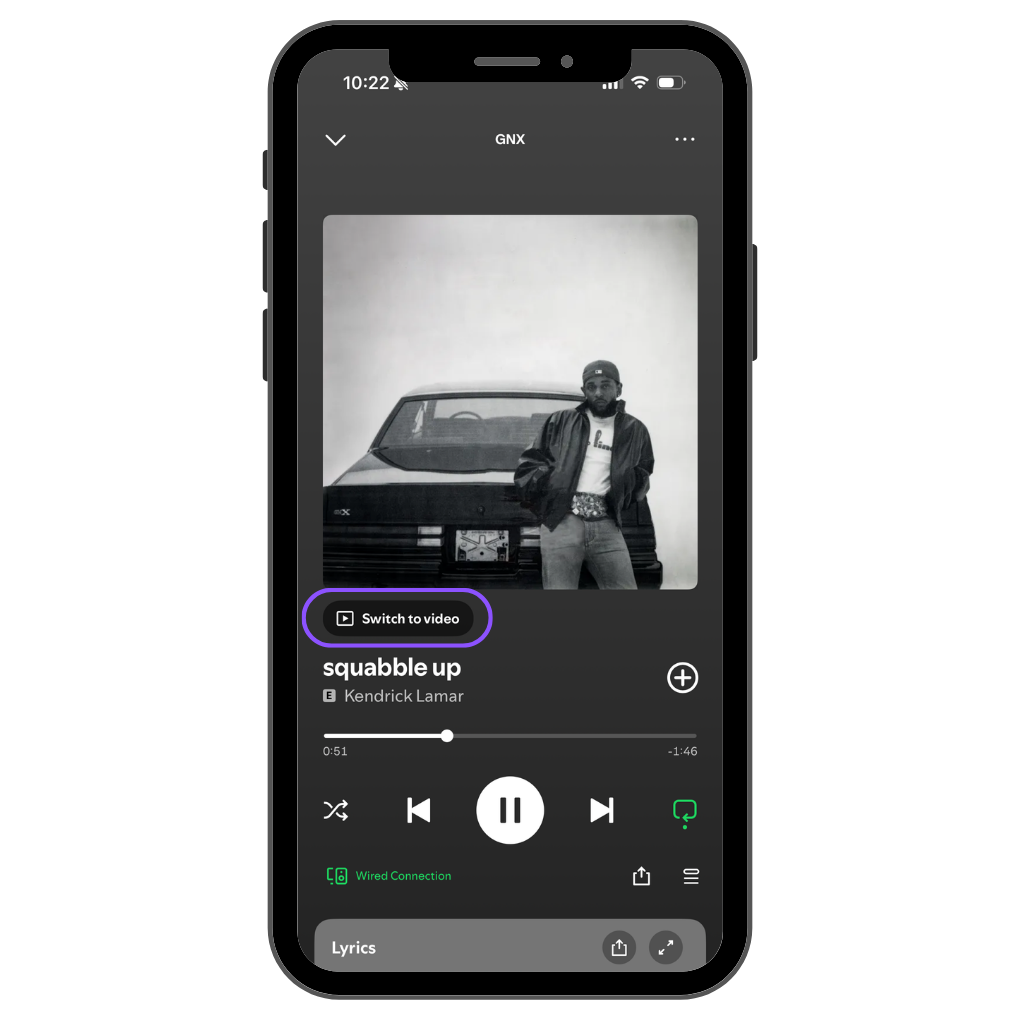
Spotify Music Videos Overview:
- Music videos are full-length, official videos tied to a specific track
- Videos live directly inside Spotify alongside the audio version
- The feature is still rolling out in beta, so availability can vary by region and release
- Videos are currently available primarily to Spotify Premium users
How Are Spotify Music Videos Different From Clips and Canvas?
The core differences is that they are full length music videos, while clips are just snippets, and canvases are just a short looping visual.
Spotify Music Videos
- Full-length, official videos tied directly to a song.
Spotify Canvas
- Short (3-8 Seconds) looping visuals that play during audio playback
Spotify Clips
- Short (30 Seconds Max), vertical videos that live on your artist profile.
- Learn more about How to get Spotify Clips
Why Upload Music Videos to Spotify?
Uploading music videos to Spotify offers several key benefits:
- Higher engagement: Fans spend more time with tracks that include video
- Stronger storytelling: Visuals help reinforce your brand and identity
- Better fan retention: Listeners can stay inside Spotify instead of bouncing to YouTube
- More value from releases: Your existing video assets now work harder
For independent artists, this is a rare opportunity to compete visually without needing massive budgets or editorial placement.
Who Can Upload Music Videos to Spotify?
Music video uploads are handled through participating distributors and partners, not directly through Spotify for Artists.
Eligibility typically depends on:
- Your distributor supporting Spotify music videos
- Your video being an official, full-length music video
- Meeting Spotify’s technical and content guidelines
Distrokid has been confirmed to support Spotify music videos, however, you can check with your distributor to see if they support this feature.
We expect Spotify Music Videos will continue to be integrated with more distributors throughout the year.
Related Article: How to Get a TikTok Artist Account
Step-by-Step: How to Upload Music Videos to Spotify
1. Confirm Your Distributor Supports Spotify Music Videos
Not all distributors currently support video uploads to Spotify. Check with your distributor’s help center or support team to confirm availability.
If they don’t support it yet, you may need to wait or consider a distributor that does.
2. Prepare Your Music Video File
Before uploading, make sure your video meets Spotify’s requirements. While specs may evolve, most distributors require:
- Resolution: High-quality HD video
- Aspect ratio: Landscape (typically 16:9)
- File format: MP4 or MOV
- Audio: Same master as your Spotify track
- No watermarks or logos
- Clean metadata (artist name, track title, ISRC)
Your video must exactly match the audio version already live on Spotify.
3. Upload Through Your Distributor
Once your video is ready:
- Upload it through your distributor’s dashboard
- Match it to the correct Spotify track
- Submit for review and delivery
Approval timelines vary, but expect anywhere from a few days to a few weeks depending on the distributor and Spotify’s review process.
If your distributor is DistroKid, you can follow these instructions How to Upload Music Videos to Spotify with DistroKid.
4. Verify the Video Is Live on Spotify
After approval, your music video will appear:
- On the track’s page in the Spotify mobile app
- As a “Switch to video” option for listeners
You don’t need to take additional action inside Spotify for Artists once it’s live.
You can see Spotify For Artists Support Article for Music Videos for more info.
Common Questions About Spotify Music Videos (FAQs)
Are Spotify music videos available worldwide?
Spotify music videos are rolling out gradually, so availability currently varies by country, device, and account type. Not all listeners will see music videos yet, even if your video has been approved.
Do Spotify music videos affect royalties?
No. Streaming a music video on Spotify pays the same royalties as streaming the audio track. Video streams count as standard Spotify streams for payout purposes.
Can I upload lyric videos, visualizers, or cover song videos to Spotify?
Spotify currently accepts official, full-length music videos only.
Your music video must not be a lyric video, visualizer, or cover song. The video must correspond to your original recording that is already live on Spotify.
Related Article: How many streams to go platinum?
Final Thoughts: Should Artists Upload Music Videos to Spotify?
If you already have official music videos or plan to create them, uploading music videos to Spotify is a no-brainer. It adds depth to your release, keeps fans engaged longer, and helps you compete in a discovery-driven ecosystem.
As Spotify continues to blur the line between audio and visual, artists who adopt new features early are more likely to benefit from increased engagement and discovery.
Vous cherchez à promouvoir votre musique ?
Essayez nos services Spotify Playlist Pitching et TikTok Music Promotion.